Skip to content

Product Suite

Time Tracking

Specialist capability. Shared platform. Agentic execution.

Time Tracking runs as part of the Advanze Execution Platform, so the application is not isolated software. It shares the same data foundation, workflow engine, security model and agentic AI fabric as the rest of the enterprise suite. Teams get the specialist capability they need without creating another silo.

People operations team coordinating employee lifecycle and access governance.
Time Tracking starts with people trying to make the right call. It starts with a person trying to get time tracking work done without losing context. They need the next action to be clear, but they also need confidence that the platform has checked the risk, evidence, permissions and downstream impact.

Product Suite / Time Tracking

From application to execution capability

Advanze is positioned around the idea that enterprise software must evolve from passive systems of record into active systems of execution. In that model, this page is not just a feature description. It explains how Time Tracking contributes to an operating environment where people define intent, agents execute governed work, and leadership can see progress through unified data.

The value is strongest when the capability is connected to adjacent processes. Records, workflows, controls, communications and analytics should not live in separate tools. They should participate in a shared execution fabric that can coordinate work across departments while preserving human accountability.

People operations team coordinating employee lifecycle and access governance.
Where Time Tracking becomes real work people can trust. The person is no longer carrying the full burden alone. Agents assemble context, route specialist checks, pause when judgement is required and record what happened so Time Tracking work feels calmer, faster and accountable.

Core capabilities

What Time Tracking enables

Each capability is designed to work as part of the broader execution platform rather than as a disconnected module.

Intelligent Time Capture

Record time spent on projects, tasks, and activities with minimal friction. Agents infer time allocation from activity patterns, suggest time entries based on calendar events and work items, and prompt users when time logs are incomplete or overdue.

Project-Based Time Allocation

Link time entries directly to projects, deliverables, and client engagements for accurate costing. Time data flows automatically into project financials, utilisation reports, and billing systems without manual transfer or reconciliation.

Leave and Absence Management

Track vacation, sick leave, and other absences with policy-aware approval workflows. Agents enforce accrual rules, check team coverage before approving time off, and update resource availability across project schedules automatically.

Resource Utilisation Analytics

Monitor billable versus non-billable time, capacity utilisation, and productivity trends. Dashboards reveal under-utilised resources, over-allocated teams, and opportunities to rebalance workload for optimal efficiency.

Timesheet Approval Workflow

Route timesheets through manager and finance approval chains with automated validation. Agents verify time entries against project budgets, flag policy violations, and escalate discrepancies before payroll processing or client billing.

Billing and Payroll Integration

Feed approved time data directly into billing systems for client invoicing and payroll for employee compensation. Time records become source-of-truth for revenue recognition, labour cost allocation, and compliance reporting without duplicate entry.

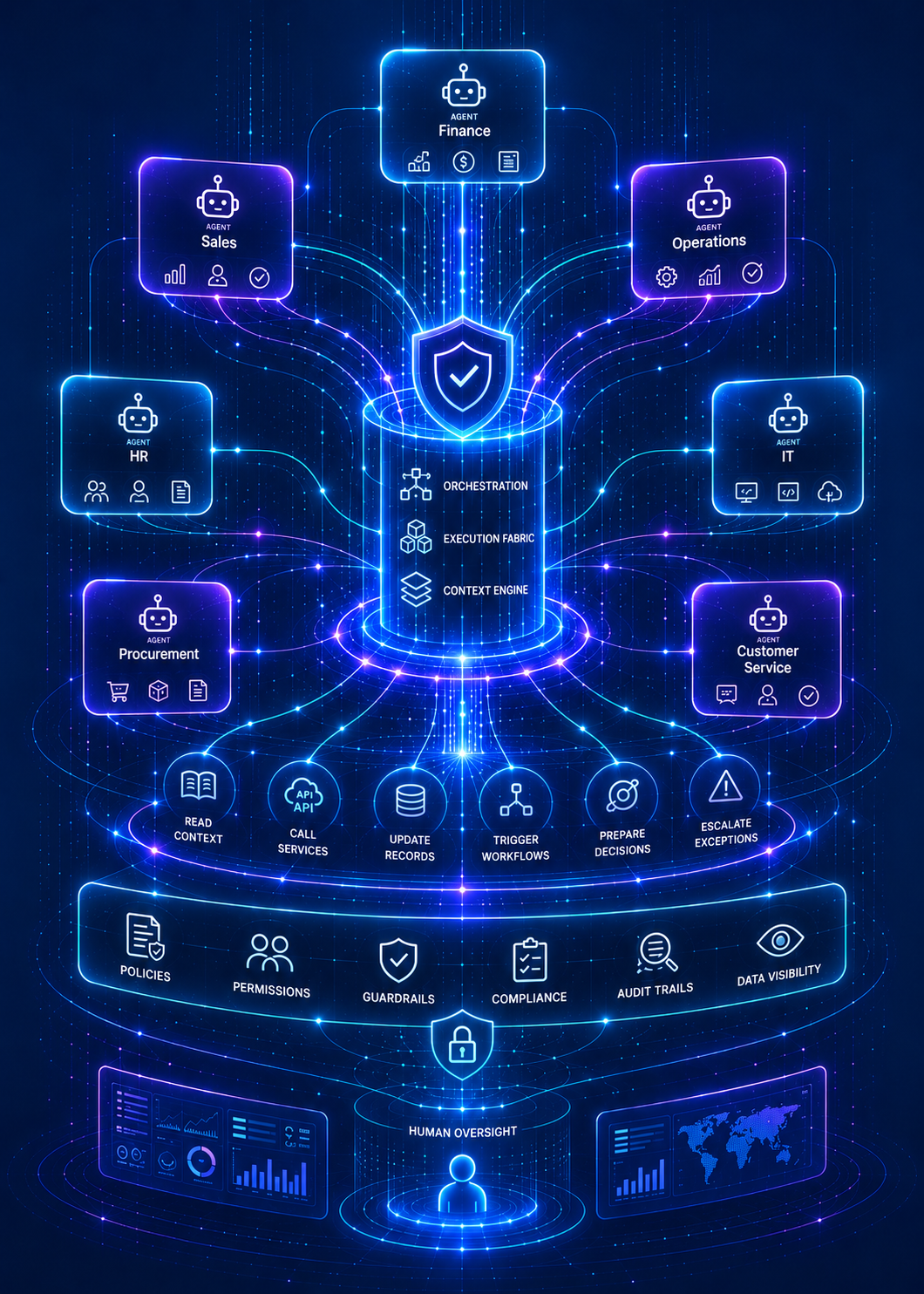
The Advanze Control Model - AI Agents Execute Work Inside the Control Model

Agentic operating model

AI agents execute work inside the control model

Advanze treats AI agents as participants in the operating model. Agents can read context, call services, update records, trigger workflows, prepare decisions and escalate exceptions. Human teams remain responsible for judgement, governance and business accountability.

That distinction matters. The goal is not to add another chatbot to existing systems. The goal is to create an execution platform where work can move across functions with consistent permissions, policies, audit trails and data visibility.

Business outcomes

What becomes possible

Fewer silosShared data and workflows reduce duplicated effort.
Faster executionAgents can progress repeatable work across rules, approvals and systems.
Better visibilityLeaders see work, risk and performance in one operating context.
Lower platform sprawlSpecialised capability without another disconnected vendor.
People operations team coordinating employee lifecycle and access governance.
The outcome is not just automation. It is confidence in what happens next. The person is no longer carrying the full burden alone. Agents assemble context, route specialist checks, pause when judgement is required and record what happened so Time Tracking work feels calmer, faster and accountable.

Agentic use case

Where Time Tracking becomes governed execution.

It starts with a person trying to get time tracking work done without losing context. They need the next action to be clear, but they also need confidence that the platform has checked the risk, evidence, permissions and downstream impact.

What makes it harder in the real world: Time tracking work looks straightforward until it crosses people, systems, policies, approvals and customer impact. In practice, the work may require the right customer or employee context, policy checks, data quality, approvals, exception routing, integration updates and a clear audit trail.

What Advanze changes: Time Tracking turns time tracking activity into governed execution by connecting employee, manager, access, policy and lifecycle context to agents, workflow, permissions, approvals and audit evidence before work is completed.

Time Tracking Intake AgentClassifies new time tracking work, identifies intent, urgency, context requirements and the likely execution path.
Time Tracking Context AgentGathers related records, history, documents, messages, policies, metrics and system state needed for time tracking decisions.
Time Tracking Processing AgentPrepares the recommended action, draft update, workflow step or system change for time tracking work.
Guardrail AgentChecks permissions, policy thresholds, sensitive data, financial exposure, compliance implications and approval requirements.
Workflow Orchestration AgentRoutes reviews, manages approvals, records evidence and coordinates safe system updates after approval.
Challenge

Time Tracking starts as a single app experience, but the real work usually depends on context from other teams, policies, data and systems.

Orchestration

Advanze treats Time Tracking as part of a governed execution fabric. The app captures the work, agents gather context, workflow routes approvals and the control model determines what can safely happen next.

Success

Time Tracking becomes more than a screen. It becomes a reliable path from intent to controlled action, with people still responsible for judgement and the platform carrying evidence.

People operations team coordinating employee lifecycle and access governance.
People operations 16Employee lifecycle, access and workforce work coordinated across people, systems and approvals.
People operations team coordinating employee lifecycle and access governance.
People operations 17Employee lifecycle, access and workforce work coordinated across people, systems and approvals.
People operations team coordinating employee lifecycle and access governance.
People operations 18Employee lifecycle, access and workforce work coordinated across people, systems and approvals.

Why AI execution needs architecture

The work needs context, controls and clear permissions before automation can safely act.

Time Tracking is valuable when it participates in the Advanze control model: identity, permissions, workflow, policy checks, data context, audit evidence and human approval boundaries sit inside the execution path.

  • Time Tracking work needs the right employee, manager, access, policy and lifecycle context before an agent or user can act with confidence.
  • The process often crosses handoffs, approvals, exception paths, SLAs and downstream system updates.
  • Different actions need different permission levels: read, draft, update, approve, send, pay, create, close or escalate.
  • The business needs evidence of what was requested, what was checked, who approved, what changed and why.

Implementation path

How to move from concept to production

Advanze can be introduced progressively. The recommended path is to start with a visible workflow, prove the operating model, then expand into adjacent capabilities as the platform foundation matures.

  1. 1
    Assess the current operating model

    Map the workflows, systems, data sources and manual coordination points around this capability.

  2. 2
    Design the target execution flow

    Define the data model, human approvals, agent tasks, service calls and governance controls.

  3. 3
    Launch a focused implementation wave

    Start with a bounded use case that proves the operating pattern and creates reusable platform assets.

  4. 4
    Scale across the business

    Extend the pattern to adjacent workflows, more agents, more users and deeper integrations.

Next step

Build this into your execution platform roadmap

Explore how Time Tracking can be implemented as part of a broader Advanze platform adoption programme, from first pilot to enterprise scale.